Finding a free VPN is easy. Finding one you’d actually want to leave running on your phone or laptop all day takes a little more work.
Spend some time browsing VPN discussions on Reddit, and you’ll notice a familiar pattern. Some users are looking for a simple way to hide their IP addresses. Others want unlimited data, better protection on public Wi-Fi, or a VPN that works without asking them to create yet another online account.
Then there are the practical frustrations: slow connections, unexpected data limits, crowded servers, and apps that keep pushing users toward a paid subscription.
For most people, the ideal free VPN is fairly simple. It should protect their privacy, run smoothly in the background, and stay out of the way while they go about their day.
So, what should you actually look for when choosing one? Here’s how I’d narrow down the options, check their privacy practices, and evaluate their performance in everyday situations.
1. Start with how much information the VPN asks for
One of the first things I look at when evaluating a free VPN is what users need to provide before they can connect.
Some apps require an email address and password. Others ask you to create an account, verify your identity through email, or enter payment details to activate a free trial.
If your main reason for downloading a VPN is to improve your online privacy, a service that keeps registration requirements to a minimum is worth considering.
For example, X-VPN’s free VPN offers unlimited data, an independently audited no-logs policy, and access without account registration or payment details. You can download the app, connect to a server, and start browsing without creating another online account.
This is particularly convenient if you’re traveling, connecting to hotel Wi-Fi, or simply looking for an easy way to add more privacy to your daily browsing.
Before downloading any free VPN, I’d check three things:
- Can I use it without creating an account?
- Do I need to provide payment information?
- Is it permanently free, or is it a limited-time trial?
A straightforward setup makes it much easier to start using a VPN regularly, especially if you want to install it across multiple devices.
2. Understand how the free VPN makes money
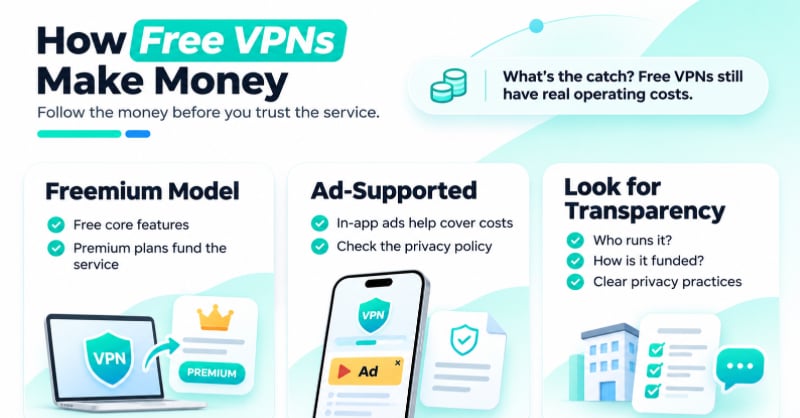
One question that frequently appears in online VPN communities is: What’s the catch?
It’s a fair question. Running a VPN involves ongoing expenses, including server infrastructure, bandwidth, software development, and security maintenance.
Understanding how a provider covers those costs can help you make a more informed decision.
The freemium model
Many established VPN providers offer both free and paid versions of their services.
Free users get access to core VPN functionality, while premium subscribers pay for additional benefits such as more server locations, specialised servers, and advanced features.
Revenue from subscriptions helps support the free service.
This model works particularly well for people who need basic privacy protection but don’t necessarily require every feature available in a premium VPN.
It also gives users the flexibility to explore the service before deciding whether a paid subscription is worth it.
Advertising-supported VPNs
Some free VPNs also generate revenue through in-app advertising.
When evaluating an ad-supported VPN, I’d look at its privacy policy to understand how advertisements are delivered and what information is shared with advertising partners.
The location and frequency of advertisements matter from a usability perspective, too. An app that displays an occasional advertisement may fit comfortably into your routine.
The important thing is that the provider clearly explains its advertising practices and funding model.
Look for transparency
A trustworthy VPN provider should be able to explain how its free service is funded.
I’d also look for a clearly identified company, accessible customer support, and detailed information about its privacy and security practices.
If you’re going to route your internet traffic through a company’s infrastructure, it’s worth knowing a little about the company itself.
3. Look beyond the words “no logs”
Almost every privacy-focused VPN uses the term “no logs” somewhere on its website.
What interests me more is the detail behind that claim.
A well-written privacy policy should explain how the provider handles information such as:
- Your original IP address.
- Browsing history and visited websites.
- DNS queries.
- VPN connection timestamps.
- The VPN servers you connect to.
- Information that could associate your online activities with your identity.
These details give you a much clearer picture of how a VPN approaches privacy.
I’d also look at what operational information the company collects. Some providers use aggregated performance statistics or diagnostic data to maintain their services, identify technical problems, and improve connection reliability.
Ideally, the privacy policy should explain what information is collected, why it’s collected, and how it’s handled.
Check for independent no-logs audits
An independent no-logs audit is one of the more useful things to look for when evaluating a VPN provider.
It allows an external organisation to examine relevant systems, processes, and privacy practices against the provider’s stated commitments.
When researching a VPN, I’d check:
- Who conducted the audit?
- When was it completed?
- What systems and practices were examined?
- Does the provider make information about the assessment available to users?
Providers that publish detailed information about their privacy assessments give users a stronger basis for making their own decisions.
Look at the provider’s broader security practices
Beyond no-logs audits, there are several other indicators worth exploring.
Open-source VPN protocols, independent security assessments, transparency reports, and publicly documented security improvements can all help you understand how seriously a company approaches privacy.
For me, a VPN that provides meaningful technical information is far more interesting than one that simply fills its homepage with promises about complete anonymity.
4. Choose a free VPN you can actually use every day
Privacy features are important, but everyday usability deserves just as much attention.
A VPN should fit into your routine without requiring constant adjustments.
This is where discussions on Reddit and other technology communities can be particularly useful. Users often bring up practical issues that aren’t immediately obvious from a product’s feature list.
Unlimited data makes everyday use easier
Some free VPNs offer a fixed monthly data allowance, while others provide unlimited data.
A 10GB monthly allowance might sound generous when you’re mainly thinking about checking emails or browsing a few websites.
But consider what happens when you leave your VPN connected throughout the day.
Your phone might automatically download app updates, synchronise photos, load social media videos, or back up files in the background. On a laptop, cloud storage and software updates can consume even more data.
Here’s a simple example of how long a 10GB allowance would last at different usage levels.
| Daily Data Usage | How Long 10GB Would Last |
| 100 MB | 100 days |
| 500 MB | 20 days |
| 1 GB | 10 days |
| 2 GB | 5 days |
| 5 GB | 2 days |
If you regularly watch videos, work remotely, or keep several applications running at once, your data usage can add up surprisingly quickly.
I’d personally prioritise unlimited data for a VPN that I intend to keep connected throughout the day. It removes the need to constantly check how much bandwidth is left.
Manual server selection gives you more flexibility
Server selection is another recurring topic in free VPN discussions.
Some services automatically connect users to an available server, while others let users manually choose from a selection of locations.
Automatic selection is convenient when you simply want to get connected. Manual selection becomes especially useful when you want to find a nearby server, improve latency, or switch away from a busy location.
For example, if you’re traveling and using a hotel Wi-Fi network, connecting to a geographically nearby VPN server will often be a good starting point for maintaining a responsive connection.
I’d look for a free VPN that offers both convenient connection options and enough flexibility to switch locations when needed.
You don’t necessarily need hundreds of server locations. Having a useful selection of accessible servers is what matters for everyday browsing.
Check how your free VPN performs in everyday use
Speed is one of the first things you’ll notice when using a free VPN.
Pages should load quickly, videos should play smoothly, and everyday apps should feel responsive.
I’d recommend running a few speed tests at different times of the day, particularly during busy evening hours when more people may be using free servers.
Here are four things worth paying attention to:
- Download speed: Important for browsing, streaming, and downloading files.
- Upload speed: Useful for video calls, cloud backups, and sharing large files.
- Latency: Especially important for online gaming and real-time communication.
- Connection stability: Essential for keeping your VPN running throughout the day.
Start by testing your regular internet connection. Then connect to a nearby VPN server and repeat the test using the same device and network.
Try a few different server locations and see which provides the most comfortable experience.
I’d also spend some time using the applications you normally rely on. Watch a YouTube video, join a video call, browse social media, or download a large file.
If everything runs smoothly, you’ve probably found a free VPN that fits your daily routine.
5. Make sure essential security features are included
When comparing free VPNs, pay particular attention to the security features available on the device you’re actually going to use.
I’d prioritise the following three areas.
Strong encryption and modern VPN protocols
Encryption protects the information traveling between your device and the VPN server.
Look for established encryption technologies, such as AES-256 or ChaCha20, and modern VPN protocols designed to provide secure, efficient connections.
WireGuard and OpenVPN are two widely used protocols. Some VPN providers also develop their own protocols to improve connection speed, reliability, and security.
When looking at a custom-built VPN protocol, I find it useful to check whether the provider publishes technical documentation, makes its source code available, or commissions independent security assessments.
These are valuable indicators of a provider’s commitment to developing and maintaining its technology.
Kill switch
Imagine you’re working in a coffee shop and your Wi-Fi connection briefly drops. Your laptop reconnects automatically, and your applications continue sending data in the background.
A VPN kill switch is designed to prevent internet traffic from traveling through your regular connection when the VPN tunnel unexpectedly disconnects.
This feature is particularly useful for people who frequently switch between networks or keep their VPN connected for extended periods.
If you’re choosing a free VPN for your phone, check whether the kill switch is available on your operating system and whether it needs to be enabled manually.
I’d turn it on before using the VPN on unfamiliar networks.
DNS and IP leak protection
When you connect to a VPN, your network traffic should be routed through its protected connection.
DNS leak protection helps prevent DNS requests from being exposed outside the intended tunnel, while IP leak protection helps keep your original public IP address private.
These are features worth looking for in a VPN, particularly if privacy is your main reason for using one.
Fortunately, you can perform a few basic checks yourself without needing advanced technical knowledge.
6. Run a few simple privacy tests
One of the most useful suggestions you’ll find in online VPN communities is to spend a few minutes checking your connection after installing a new VPN.
Here are the tests I’d start with.
Test your public IP address
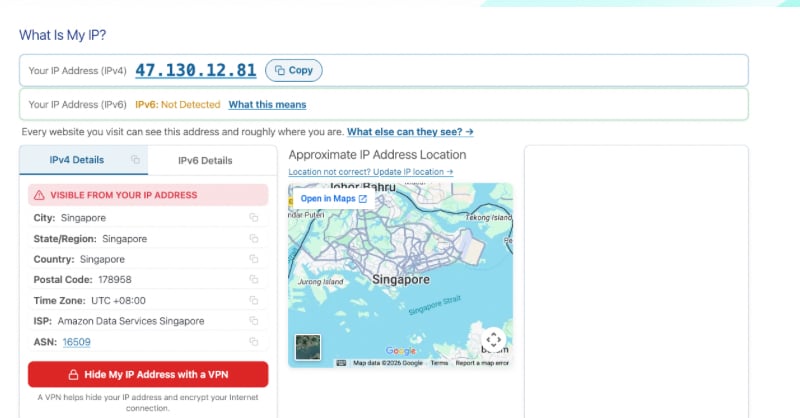
This is probably the easiest VPN test to perform.
- Before connecting to the VPN, search for your public IP address.
- Make a note of the address.
- Open your VPN app and connect to a server.
- Check your public IP address again.
You should see a different public IP address associated with your VPN connection.
I’d also check the approximate location associated with the new IP address to confirm that it broadly matches the VPN server location I selected.
Run a DNS leak test
Next, search for a DNS leak testing tool and run a test.
For a more useful comparison, perform the test both before and after connecting to your VPN.
Pay attention to the DNS providers displayed in each result. If you see your regular internet provider’s DNS servers while connected to the VPN, check the app’s DNS settings and consult its support documentation.
It’s also worth checking your browser’s secure DNS settings, as these can affect the results you see.
The entire process only takes a few minutes and gives you a better understanding of how your connection is being handled.
Test how the VPN handles network changes
This is especially useful for mobile users.
Try connecting to your VPN while using Wi-Fi, then switch to mobile data and see how quickly the app reconnects.
You can also lock your phone for a few minutes, unlock it, and check whether the VPN connection remains active.
For laptop users, try putting your device to sleep and checking the connection when you wake it up.
These are everyday situations that reveal how conveniently a VPN fits into your routine.
A reliable VPN should require very little attention once you’ve configured it the way you want.
7. Pay attention to the little things
Some of the most important differences between free VPNs only become apparent after you’ve used them for a few days.
This is something I find particularly interesting about community discussions. People often focus less on encryption specifications and more on whether the app works comfortably alongside everything else on their devices.
Here are a few practical questions I’d ask while evaluating a VPN:
- Does it reconnect automatically when the internet connection changes?
- How quickly does it establish a connection?
- Is switching between servers straightforward?
- Does the app interfere with other applications?
- How easy is it to manage connection settings?
- Can it run comfortably in the background?
- Does it have a consistent interface across different devices?
Battery consumption is worth paying attention to on mobile devices, particularly if you plan to keep your VPN connected all day.
You can usually check this through your phone’s built-in battery usage settings after a few days of normal use.
I’d also pay attention to the app’s permission requests. Look for permissions that are relevant to VPN functionality and clearly explained by the provider.
These small details often determine whether you’ll continue using a VPN long after downloading it.
8. Match the free VPN to your actual needs
Different people use VPNs for different reasons.
Before spending too much time comparing features, think about where and how you’ll actually use your VPN.
| Your Main Use Case | Features to Prioritise |
| Everyday browsing | Unlimited data and stable connections |
| Public Wi-Fi | Strong encryption and kill switch |
| Working remotely | Reliable speeds and connection stability |
| Traveling | Flexible server selection and easy setup |
| Mobile browsing | Automatic reconnection and an intuitive app |
| Video streaming | Download speed and unlimited data |
| Online gaming | Low latency and nearby servers |
| Privacy-focused browsing | Independently audited no-logs policy and minimal registration requirements |
For example, someone who travels frequently might value quick connections and easy server switching. A student may care more about unlimited data and the ability to use a VPN without paying for another subscription.
If you’re primarily interested in online privacy, I’d put the provider’s no-logs policy, encryption, and security practices at the top of the list.
Identifying your main priorities makes it much easier to choose a service without getting distracted by features you rarely use.
9. Build better privacy habits around your VPN
A VPN works particularly well as part of a broader approach to online privacy.
Alongside keeping your internet connection protected, there are several simple habits worth developing:
- Keep your operating system, browser, and VPN app updated.
- Use unique passwords for important online accounts.
- Enable two-factor authentication wherever possible.
- Review the permissions granted to mobile apps.
- Use your browser’s built-in tracking protection.
- Be selective about the personal information you share online.
Websites use cookies, account logins, and browser fingerprinting to recognize visitors, so managing your browser privacy settings is also worthwhile.
Together, these habits can help reduce unnecessary exposure of personal information and make your everyday online activities more secure.
The best part is that most of these steps require very little effort once you’ve set them up.
My checklist for choosing a free VPN
If I were narrowing down my options for a free VPN today, I’d focus on the following criteria.
| What to Check | What I’d Look For |
| Account requirements | Access without unnecessary registration |
| Data allowance | Unlimited data for everyday use |
| Privacy policy | Clear and detailed no-logs commitments |
| Independent audits | Relevant privacy and security assessments |
| Business model | Transparent funding and operating practices |
| Encryption | Modern, established security technologies |
| VPN protocols | Secure and efficient connection options |
| Server selection | Accessible locations and flexible connections |
| Leak protection | Reliable IP and DNS protection |
| Connection performance | Smooth browsing and stable everyday use |
| Device compatibility | Support for both mobile and desktop devices |
| App experience | Simple controls and convenient background operation |
I’d start with privacy and security, then narrow down my options based on performance, convenience, and the features I actually need.
Once I’ve found a promising option, I’d spend a few days using it in normal situations. That usually provides a much clearer picture than comparing feature lists alone.
Final thoughts
A good free VPN should make online privacy easier, not more complicated.
Look for a provider with transparent privacy practices, an independently audited no-logs policy, modern security technology, and enough flexibility to support your everyday internet usage.
Unlimited data, straightforward setup, and reliable connections are especially valuable if you want to make using a VPN a regular habit.
Take a few minutes to research the company, check its privacy policy, and run some basic connection tests. Then see how comfortably the VPN fits into your normal routine.
For many people, a well-designed free VPN already offers everything they need to enjoy a more private and secure online experience, without adding another monthly subscription to their budget.